Best Open-Source Tools for AI-Drawn Architecture Diagrams to Know Before 2027
Eight open-source tools that let a coding agent draw your architecture: what each one solves, what it is missing, and when to use it.
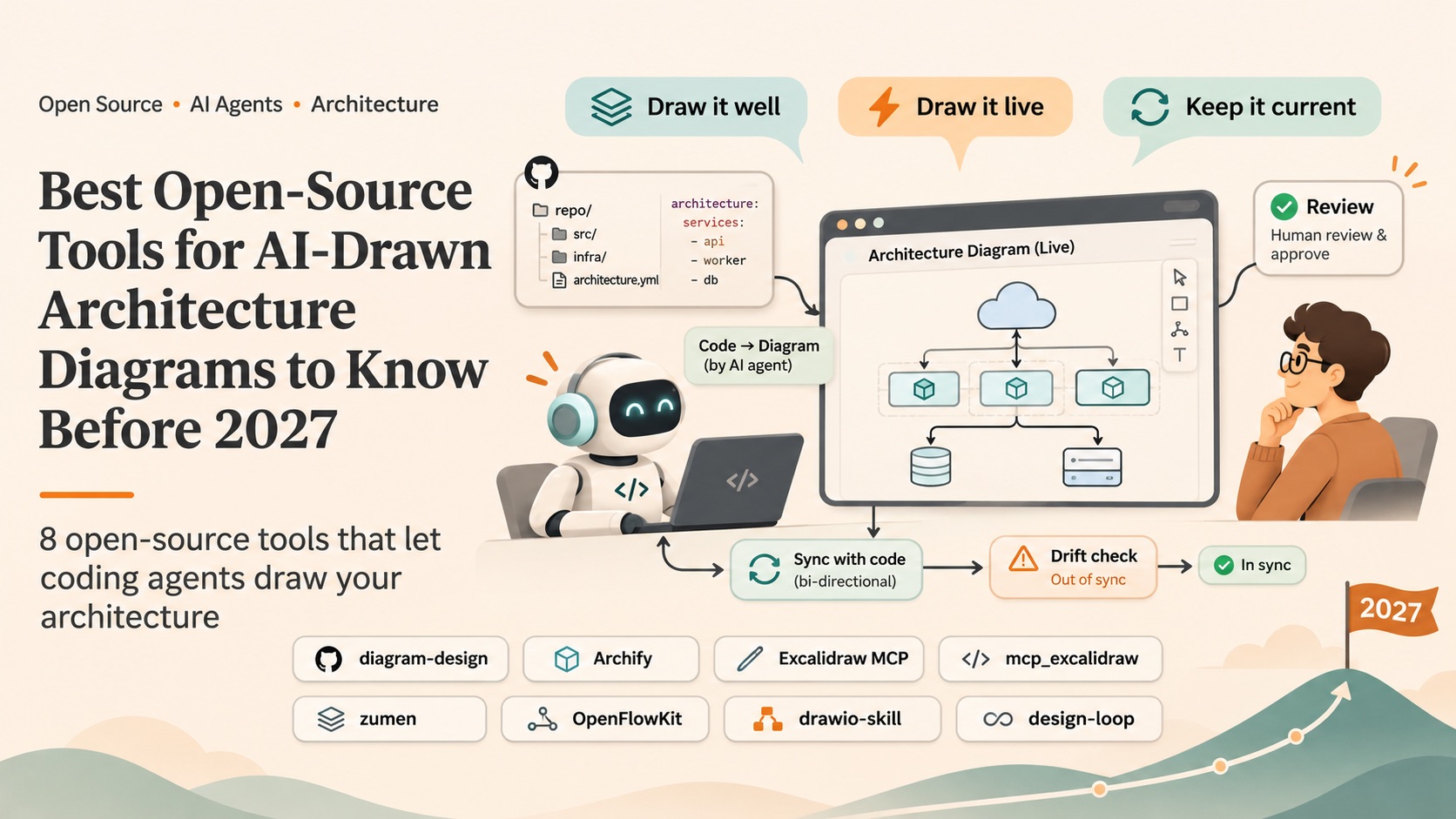
The Problem
Architecture diagrams go out of date. Updating them is manual work, nobody has time for it, and a few months later the diagram describes a system that no longer exists. A wrong diagram is worse than no diagram, because people still trust it.
What These Tools Solve
They let a coding agent such as Claude Code, Codex or Cursor draw the diagram for you, from a prompt or from the code itself. The better ones go further: they protect the edits you make by hand, or they tell you when the diagram no longer matches the code.
Not every tool tries to do all of that. They fall into three groups:
- Draw it well. A polished diagram for a post, a deck or a review.
- Draw it live. You and the agent work on the same canvas in one session.
- Keep it current. The diagram lives in the repo and has to follow the code for months.
Every version, license and star count below is from each repository's latest commit, checked on 28 November 2026.
diagram-design
What it is. An agent skill that turns a plain-language request into one self-contained HTML file with inline SVG. cathrynlavery/diagram-design, v2.6.181, MIT, about 74,500 stars.
Problem it solves. AI-generated diagrams usually look generic. This one gives the agent a written design system, so the output looks like it came from a designer.
Good at.
- 52 diagram types, from architecture and sequence diagrams to quadrants and fishbones.
- A strict editorial style: one accent colour, 1px lines, no shadows, everything on a 4px grid, with CI checks for overlaps and contrast.
- Brand onboarding: give it your website and later diagrams use your colours and fonts.
- Redraws existing draw.io, Mermaid, Excalidraw and PlantUML files.
Missing. Its own README is clear about this. The same prompt can produce a different layout twice, and the output is not an editable source: nothing to diff in a pull request, no canvas to drag. For diagrams that change every sprint, the README recommends Mermaid.
Use it when you need one diagram to publish.
Archify
What it is. An agent skill that turns an idea, plan or repository into an interactive HTML page. tt-a1i/archify, v3.3.2, Apache-2.0 (earlier releases MIT), about 101,000 stars.
Problem it solves. Explaining a system to someone else. It builds pages you can click through, not a single static picture.
Good at.
- 10 diagram types, one-page "explainer" answers, story walkthroughs exported as 1080p video, and PR walkthroughs.
- Architecture Diagnosis for JS/TS, Python, Java, Go, Rust, C and C++: dependency cycles, tight coupling, complexity hotspots and layer-rule breaks, each linked to the source. Paired with a diagram, it shows issue counts per component, including dependencies the diagram is missing.
- Source evidence on repository-backed nodes, pinned to a commit.
Missing. The diagram is a delivered artifact. Diagnosis can tell you the diagram is out of date, but only when you ask for it; nothing keeps the diagram current between runs.
Use it when you need to understand a codebase or walk someone through it.
Excalidraw MCP (official)
What it is. The Excalidraw team's MCP App. It streams a hand-drawn diagram straight into the chat, in Claude, ChatGPT, VS Code and other clients that support MCP Apps. excalidraw/excalidraw-mcp, v0.3.2, MIT, about 5,700 stars.
Problem it solves. Getting a quick sketch without leaving the conversation. Nothing to install if you use the hosted server at mcp.excalidraw.com.
Good at.
- The diagram draws itself in the chat with smooth camera movement, and opens fullscreen for editing.
- Simple model interface: the model gets a format reference (
read_me) and one drawing tool (create_view). - Checkpoints, and a share link to excalidraw.com.
Missing. The diagram lives in the chat, not in your repo. The model cannot edit one element at a time; it re-sends the scene. Nothing connects the drawing to your code. The last commit was in March 2026.
Use it when you want a sketch in the middle of a conversation.
mcp_excalidraw
What it is. A community MCP server, CLI and agent skill that gives a coding agent a live Excalidraw canvas. yctimlin/mcp_excalidraw, v2.2.0, MIT, about 2,700 stars.
Problem it solves. One-shot diagrams come out with clipped labels and overlapping arrows. Here the agent can look at its own result and fix it.
Good at.
- 27 MCP tools to create, read, update and delete single elements, plus align, distribute, group and lock.
describe_sceneandget_canvas_screenshot, so the agent sees what it drew.- Named snapshots with rollback, Mermaid conversion, and
.excalidrawexport to commit next to your code.
Missing. The canvas is in memory unless you set EXCALIDRAW_DATA_DIR. Its REST and WebSocket APIs have no authentication; the README says to keep it on 127.0.0.1. Nothing links a shape to the code it describes.
Use it when you want to build a diagram with the agent, live, in Excalidraw.
zumen
What it is. A diagrams-as-code tool: one YAML file is the source of truth, with a small desktop editor and an MCP server. meta-taro/zumen, v0.7.0, MIT, about 1 star.
Problem it solves. When the AI redraws a diagram, it throws away your manual fixes. zumen stops that.
Good at.
- Positions you set go in a
pins:block that the AI is not allowed to write. - Every AI change arrives as a diff. Nothing changes until a person presses apply.
- Its README reports that 10 of 10 real AI round trips kept every human edit, and that pins survived regeneration in 427 of 427 example drawings.
- A validator with 176 checks, a Git merge driver, and a GUI limited to the eight operations needed to approve or reject changes.
# pins is the human-only channel. The AI must never write here.
pins:
  reception:
    position: { x: 240, y: 120 }
nodes:
  - id: reception
    label: Reception
Missing. It does not look at your code, so it cannot tell when the diagram is wrong. Its own README says layouts become unreadable past about 30 nodes. It is general purpose, from subway maps to dental charts, not built for software architecture.
Use it when you edit diagrams together with an AI and need your edits to stay.
OpenFlowKit
What it is. A local-first diagram app (browser and CLI) with a text DSL, a canvas and an MCP server. openflowkit/openflowkit, v2.2.0, MIT, about 1,000 stars.
Problem it solves. Diagrams drawn from memory are guesses. OpenFlowKit draws from the repository and shows where each part comes from.
Good at.
- Map mode: give it
owner/repoand it draws the system, with thefile:linebehind every arrow. - Text and canvas are the same diagram. Imports Mermaid, Structurizr and D2.
- 29 MCP tools, including
discover_architecture,drift_reportandexplain_element. - A GitHub Action that comments on pull requests with the diagram diff and drift.
Missing. Its docs are upfront about the drift check: it matches by element name and technology only, so a renamed service looks like a deletion plus an addition. There is no watcher; you re-run discovery yourself. The Action runs on pull requests that change diagram files, so a pull request that changes only code does not trigger it by default. Agent edits on the canvas apply directly, each as one undo step.
Use it when you want a diagram generated from the code, with sources you can click.
drawio-skill
What it is. An agent skill and CLI (diagramctl) that produces editable .drawio files from prompts and from real sources. Agents365-ai/drawio-skill, v3.5.0, MIT, about 11,000 stars.
Problem it solves. Regenerating a diagram from code wipes out the layout you tuned. Its sync command updates the diagram and keeps the layout.
Good at.
- Imports from Python, JS/TS, Go and Rust code, Terraform, Kubernetes, docker-compose, SQL, OpenAPI, AsyncAPI, Protobuf and GraphQL.
synckeeps positions and styles, adds new parts below the canvas, shows removals as faded red, and writes to a new file for review. When you and the source both changed the same label, it keeps yours and reports a conflict.- Architecture rules as CI tests: internet-to-database access, cycles, orphans, trust boundaries.
python3 scripts/diagramctl.py sync architecture.drawio ./infra \
  --from terraform -o architecture.next.drawio
Missing. Sync only knows what its importers can parse: imports and infrastructure, not the component boundaries a person decided on. Native export needs the draw.io desktop app. The surface is large, with eleven CLI subcommands.
Use it when your architecture is your infrastructure code or your import graph.
design-loop
What it is. A typed design map stored in the repo (.design/), with an MCP server for the agent, a CLI and a local viewer for the human, and a Claude Code Stop hook. asadani/design-loop, MIT, 0 stars, first published in November 2026.
Problem it solves. The diagram falls behind the code during normal agent work, and nobody notices until it is wrong.
How it works.
- Each node cites the folders or files it describes, and stores a hash of that code.
- The agent can read the map and propose changes. It has no tool to apply them. A person applies or rejects each proposal in the CLI or the viewer.
- Positions live in a
pins.yamlthe agent cannot write (the same idea as zumen). - After every agent turn, the Stop hook checks the code and raises signals:
cite-moved     code a node cites changed since the map last matched it
cite-missing   a cited path no longer exists
uncovered      new code in a watched folder that no node covers
If there is a signal, the agent is stopped once and asked to propose an update.
Good at.
- The check runs on every agent turn without anyone asking, and every change waits for a person.
- The project's own benchmark replays 195 real commits of gopass (June to November 2026) in 13 checkpoints, two of them controls with no architectural change. It reports that the signals flagged 35 of 42 architectural changes with 2 false alarms, and that an agent updating the map fixed 31 of 33 drift cases in the checkpoint they appeared, across three runs, with nothing changed on the controls.
Missing.
- Very new, with no users or stars yet. The benchmark is the author's own, on one Go repository, three runs per setup.
- A new dependency inside an existing file does not trigger a signal; in the benchmark the agent drew only 44 to 50% of new dependencies.
- The automatic check is a Claude Code hook. Other MCP clients get the map and proposals, but not the per-turn check.
- The viewer is basic: no polished layout or styling. Reviewing every proposal is extra work on each change.
- It maps architecture only, with no other diagram types.
Use it when you work with a coding agent every day and want the architecture map to stay current, with every change reviewed by you.
Side by Side
| Tool | Group | Stored as | Linked to code? | Human approves? |
|---|---|---|---|---|
| diagram-design | draw well | HTML + SVG | no | n/a, one-shot |
| Archify | draw well | interactive HTML | source pinned, on ask | n/a, artifact |
| Excalidraw MCP | draw live | chat widget | no | no |
| mcp_excalidraw | draw live | live canvas | no | no, agent edits directly |
| zumen | keep current | YAML + pins | no | yes, diff then apply |
| OpenFlowKit | keep current | DSL / .openflow.json | file:line on arrows | no, undo step per edit |
| drawio-skill | keep current | .drawio + IR | via importers | sync writes a new file |
| design-loop | keep current | YAML + hashed cites | checked every turn | yes, propose then apply |
Where This Is Heading in 2027
Today, three of these tools can compare a diagram with the code: OpenFlowKit's drift_report, drawio-skill's sync and Archify's diagnosis. Two make a person approve every AI change: zumen and design-loop. Only design-loop does both, and it is also the newest and least proven of the eight. I expect checking against the code and keeping a human in charge of changes to be what these tools compete on in 2027, more than how the first diagram looks.
The Short Version
- For a diagram to publish: diagram-design. To explain a codebase: Archify.
- For a quick sketch in chat: Excalidraw MCP. To build one live with the agent: mcp_excalidraw.
- To keep diagrams current: drawio-skill for infrastructure and import graphs, OpenFlowKit for code-cited maps, zumen when your manual edits must survive, design-loop when you want the code checked every agent turn and every change approved by you.